About Displayboards
|
|
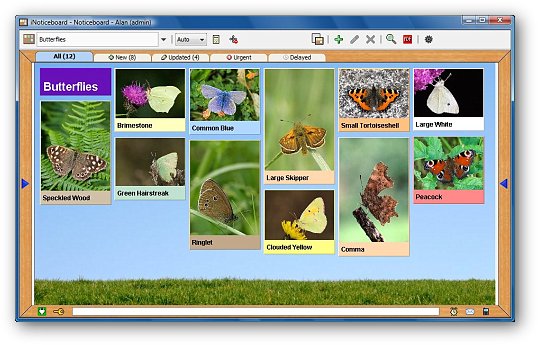
The Noticeboards can be used to produce simple Displayboards, containing pictures and text.
You can use the Noticeboard Groups to manage them, e.g. have a Group just for Displayboards.

|
|
Pictures and Styles
You can add a picture to a Notice which can act as a link to the full
size version. Clicking on the picture will open the full version in a new window.
The Notice text size, style and colour can also be set.
You
can use a custom picture or texture for the Noticeboard background. A
texture picture can be tiled to fill the whole Noticeboard. |
 |
Hyperlinks
A Notice can contain links to other Noticeboards, the Calendar, Planner
and Forum, as well as to web pages.
An easy way to link to further information.
|
 |
Share and Print
The Noticeboard can be exported to a PDF file to share with other
people or to print.
|
 |
Control Access
You can control which Noticeboards a user can see and write to, and who can create new Noticeboards.
Each
person is assigned a Role which provides default access rights. It is
very easy to override these to grant more or less rights.
You can either let a Role see all Noticeboards or specify exactly which ones they can see and which ones they can write too.
A Role can be assigned one or more Noticeboard Group and be allowed to create new Noticeboards in that group.
|
 |


